
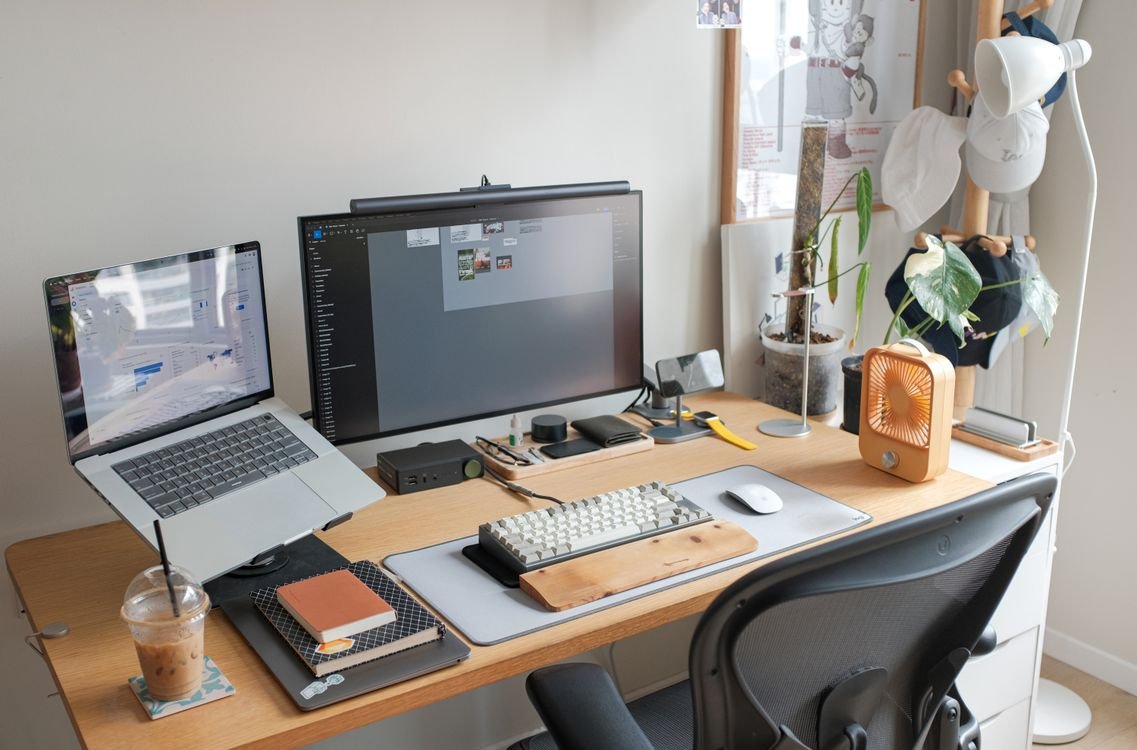
Desk shopping usually starts with width. How many monitors will fit, is there room for a laptop beside them, will the desk fill the wall without crowding it. Width matters, but it is not the measurement that decides whether your neck aches by three in the afternoon. That one is depth, the distance from the front edge of the desk to the back, and it is the dimension most home offices get wrong. A desk can be six feet wide and still leave you squinting at a screen that sits too close, because depth is what sets the distance between your eyes and the monitor, and the room your forearms have to rest.
Quick answer: For most home offices, a 30-inch-deep desk is the safe choice. It leaves room for a monitor on its factory stand (8 to 10 inches), a full-size keyboard (about 7 inches) and your forearms, while keeping the screen 20 to 30 inches from your eyes. A 24-inch desk works for a laptop or a single monitor on an arm. Anything bigger on a factory stand, and the screen ends up too close.
What Is Desk Depth, and Why Does It Matter More Than Width?
Desk depth is the front-to-back measurement of the desktop, and it does three jobs at once. It sets your viewing distance, it holds your keyboard and forearms, and it decides how much legroom you have underneath. Width only decides how much gear fits side by side. A wide desk with shallow depth still leaves you cramped, because the screen cannot move any further back than the back edge allows.
The viewing distance is the part that costs the most when it goes wrong. Ergonomic guidance from OSHA puts a comfortable monitor distance at 20 to 40 inches from the eyes, and Cornell University’s ergonomics group puts it at roughly an arm’s length, about 20 to 30 inches. Closer than 20 inches, the eye muscles work harder to hold focus, and the usual response is to lean the head forward, which loads the neck. That is the mechanism behind the afternoon ache that gets blamed on the chair.
The Depth Budget: Where Every Inch Goes
The clearest way to choose a depth is to add up what has to sit on the desk. Every item claims a strip of depth, and the total is the minimum that works without compromise.
| What sits on the desk | Depth it claims |
|---|---|
| Monitor factory stand, feet front to back | 8 to 10 inches |
| Full-size keyboard | 6 to 7 inches |
| Forearm and wrist rest space | 3 to 4 inches |
| Notebook or papers in front of the keyboard | 4 to 6 inches |
| Gap between screen and back edge for cables | 1 to 2 inches |
Add the first three rows and the total is 17 to 21 inches before a single sheet of paper has a place to sit. On a 24-inch desk, that leaves 3 to 7 inches for everything else, and the screen ends up roughly 14 to 16 inches from your eyes once the stand and keyboard are accounted for. That is inside the 20-inch minimum, and it is why a shallow desk feels fine for the first week and tiring by the third. On a 30-inch desk, the same gear leaves 9 to 13 inches spare, the screen sits a comfortable 20 to 28 inches away, and there is still room for a notebook. Six inches of depth is the difference between a desk that works and one that fights you.
How Deep Should a Desk Be for Your Setup?
Depth is not one number. It follows the gear, and the gear is what you should measure first.
| Setup | Minimum depth | Comfortable depth |
|---|---|---|
| Laptop only | 20 inches | 24 inches |
| Single 24 to 27-inch monitor on its factory stand | 28 inches | 30 inches |
| Single 24 to 27-inch monitor on a monitor arm | 24 inches | 27 inches |
| 32-inch monitor or 34-inch ultrawide on a stand | 30 inches | 30 to 32 inches |
| 32-inch monitor or ultrawide on a monitor arm | 27 inches | 28 inches |
| Dual 27-inch monitors | 30 inches | 30 inches |
The pattern in the table is the monitor stand. A factory stand eats 8 to 10 inches of depth, while a monitor arm clamps to the back edge and floats the screen over it, which recovers about 4 inches. That is why a 24-inch desk can work with a monitor arm and fails with a factory stand. The arm is the cheapest way to buy depth without buying a new desk.
There is one more depth to check, and it is under the desk. Ergonomic guidance (ANSI/BIFMA G1) calls for at least 17 inches of knee clearance and about 23.6 inches of toe extension for taller adults. On a shallow desk, the frame is what gets in the way: T-frame legs put a crossbar under the centre of the desk where knees go, while C-frame legs offset the columns toward the back and keep the legroom open. If you are buying a standing desk, check the frame shape as well as the desktop size.
24 vs 30 Inches: The Real Trade-Off
The case for 24 inches is the room, not the desk. Saving 6 inches of depth keeps walkways open in a small bedroom or an alcove, and it keeps the desk clear of a door swing or a closet. The case for 30 inches is everything on the desk. The honest way to decide is to measure the whole footprint, not just the desktop.
Every desk needs clearance behind it for the chair. Plan on 36 inches from the back edge of the desk to the wall or furniture behind it, which covers sitting down, pushing back and standing up. A 24-inch desk plus 36 inches of chair space projects 60 inches into the room. A 30-inch desk projects 66 inches. In a room 10 feet deep, the 30-inch desk still leaves 54 inches of open floor, which is plenty. In a room under 9 feet deep, or one with a door that swings behind the chair, those 6 inches start to matter, and the 24-inch desk with a monitor arm is the better compromise.
For a sit-stand desk, add 4 to 6 inches to the depth you would choose for a fixed desk. The lifting frame and motor housing take space, and the desk needs the extra depth to stay stable at standing height. A 30-inch top is the practical minimum for a sit-stand setup with an external monitor.
Your Desk Is Too Shallow? Four DIY Fixes Under $60
A shallow desk you already own is not a lost cause. These four fixes cost less than a new desk and each one buys back real depth.
1. A monitor arm, $30 to $50. A single gas-spring arm clamps to the back edge and holds the screen over the rear of the desk, recovering 4 to 6 inches of viewing distance. Check the weight rating against your monitor first; most arms in this price range hold 13 to 19 pounds, which covers a 27-inch monitor. No drilling needed, which makes it renter-friendly.
2. An under-desk keyboard tray, $25 to $45. A clamp-on or screw-mount sliding tray moves the keyboard below the desktop and frees the full 6 to 7 inches it occupied. The tray needs 14 to 20 inches of flat space underneath, so measure for a centre rail or crossbar before ordering. Clamp-on versions leave no holes, which matters in a rental.
3. A DIY monitor riser shelf, $20 to $30 in materials. A 24-by-10-inch plywood board on two 4-inch shelf brackets lifts the monitor 4 inches and slides the keyboard partly underneath the shelf, freeing the stand footprint. Sand, paint or stain the board to match the desk. The shelf also puts the screen closer to eye level, which is a second ergonomic win for the same money.
4. Move the desk out from the wall, free. A desk pushed hard against the wall wastes the 1 to 2 inches behind the monitor on cables pressed against the skirting board. Pulling the desk 3 inches out and sliding the monitor to the true back edge gains the same distance, and it gives the monitor arm room to articulate. Check the chair still has its 36 inches behind it after the move.
Measuring Your Room Before You Buy
Measure twice, in this order. First, tape the depth your setup needs on the floor with painter’s tape, using the table above, and add the 36-inch chair zone behind it. Walk the room. Open the door. Pull the chair out and stand up from it. If anything collides, the desk is too deep for that wall, and the fix is a different wall or a monitor arm, not a smaller chair.
Second, measure the route the desk takes into the room. A 60-inch-wide top turns corners badly in a narrow hallway, and a one-piece desktop that fits the room may not fit through the door. Flat-pack desks solve this, but check the assembled depth against the tape on the floor, not the box dimensions. For more on fitting a workspace into a tight room, see Home Office in a Small Space: Setup Ideas That Work and Home Office for Two People in a Small Room: Layouts That Work.
Is a 24-inch desk deep enough for working from home?
Yes for a laptop, and yes for a single monitor up to 27 inches if the monitor is on an arm. No for a 27-inch or larger monitor on its factory stand, because the stand leaves the screen about 14 to 16 inches from your eyes, inside the 20-inch minimum.
How deep should a desk be for dual monitors?
30 inches. Two 27-inch screens angled inward consume corner depth, and a 30-inch top keeps the keyboard clear of the stands. Plan on at least 55 to 60 inches of width for the pair.
Does a monitor arm really save desk depth?
Yes, about 4 inches. The arm clamps to the back edge and holds the screen over it, while a factory stand sits 8 to 10 inches forward of the edge. The same saving applies to depth you already have, which is why an arm is the first fix for a shallow desk.
What is the minimum desk depth for a 32-inch monitor?
30 inches on the factory stand, or 27 to 28 inches on a monitor arm. Larger screens need more viewing distance to avoid neck rotation at the edges, so do not go shallower than this.
How much space do I need behind my desk?
36 inches from the back edge of the desk to the wall or furniture behind it. That covers sitting down, pushing the chair back and standing up. 30 inches is the absolute minimum, and it feels tight with a rolling chair.
Depth is the cheapest ergonomic upgrade a home office has. Six inches separates a screen that sits too close from one that sits right, and the fix is often a $30 monitor arm rather than a new desk. Measure your gear, add up the depth budget, tape the footprint on the floor, and buy the depth your setup needs instead of the depth that looks right in the listing photo.


One Comment